You can view your class grades by opening the Class Menu on the Class Management screen and selecting View/Manage Class Grades.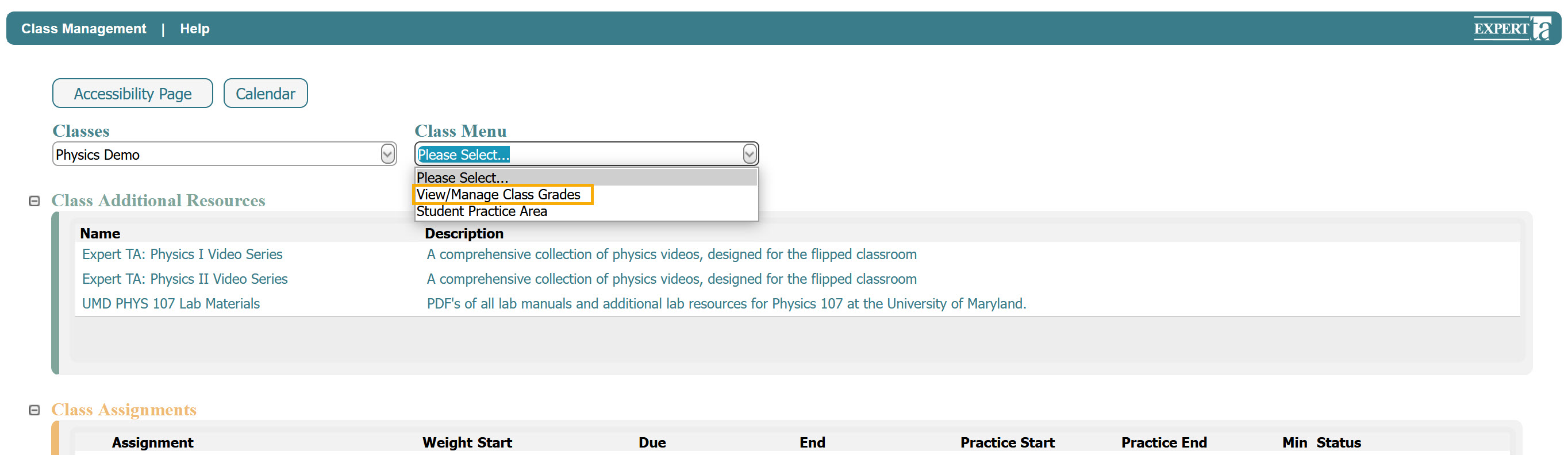
On the next screen, you will see your class grade sheet, which includes a list of all assignments in your class along with your overall average. Clicking on an assignment name will open a detailed view showing your grades for each individual problem and problem part within that assignment.
View/Manage Class Grades can be exported by selecting a file format from the Export To drop-down menu and clicking the Save button.
You can also switch between percentage and points views by selecting the Points View checkbox.
To return to the Class Management screen, click Class Management in the upper left-hand corner.
Was this article helpful?
That’s Great!
Thank you for your feedback
Sorry! We couldn't be helpful
Thank you for your feedback
Feedback sent
We appreciate your effort and will try to fix the article